
How I Built a Professional Shop Management Software (FaizanKiShop) Using AI
In the modern era of programming, the lines between an idea and its execution have been incredibly blurred thanks to the rise of advanced Artificial Intelligence. What used to take weeks of meticulous planning, designing, wireframing, frontend development, backend logic, and desktop packaging can now be orchestrated in mere hours. Today, I am incredibly excited to showcase FaizanKiShop, a complete, highly professional, and extremely responsive Shop Management Software that was entirely generated using AI.
This article serves as a comprehensive case study of our journey. We'll explore the aesthetics, the workflow, the technical hurdles we overcame, the exact AI prompts used to generate the application, and finally, how we packaged a web-based HTML/JS system into a native Windows .exe application. At the end of this article, you will find a link to download the full source code for free.
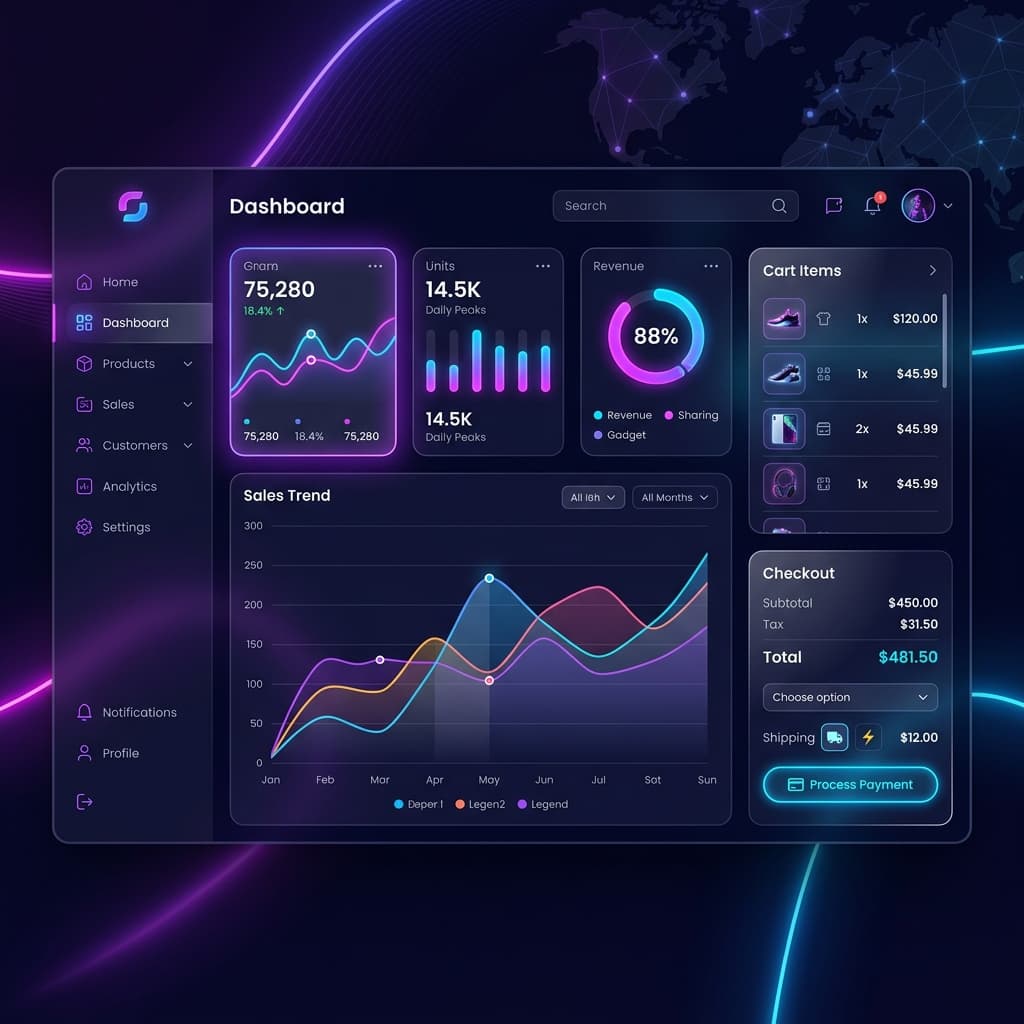
*Image Prompt used: "A highly professional, sleek, and modern web application dashboard for a Shop Management System. The UI features a dark theme with vibrant neon purple and deep blue accents. It includes a beautiful sidebar with icons, a large central area showing sales statistics, charts, a cart items list, and a modern 'Checkout' section. The design should look extremely premium, using glassmorphism effects, modern typography, and a very polished layout. No text labels except for numbers and simple UI shapes."*
The Vision: FaizanKiShop
The goal was simple but ambitious: create a fully functional, offline-capable Shop Management System that looks like a million bucks. We wanted a UI that strayed far from the boring, gray, tabular layouts of traditional POS (Point of Sale) systems. Instead, we aimed for a dark-themed, glassmorphism-inspired aesthetic with vibrant neon accents (purples and blues) that would feel right at home in a high-end tech environment.
We needed several core features:
- Dashboard: A high-level overview of total sales, total products, low stock alerts, and a revenue chart.
- Products Management: A grid layout to view, add, edit, and delete products, complete with a barcode generator.
- Sales & Billing: A fast, responsive, and robust checkout screen. It required a barcode scanner integration, a dynamic cart, and customer detail inputs.
- Stock Management: A tabular view to strictly monitor inventory levels, with visual indicators for items running low.
- Reporting: A comprehensive financial report generator to track daily, weekly, and monthly revenue.
Phase 1: Generating the Foundation
The journey began with laying the foundation. We used Vanilla HTML, CSS, and JavaScript. This approach was chosen to ensure maximum portability and absolute control over the DOM without the overhead of complex frameworks, which is crucial when porting to a desktop wrapper later.
The Initial AI Prompt
To kick things off, we provided the AI with a massive, highly detailed prompt to generate the entire structure in one go. The prompt was crucial in defining not just the functionality, but the *exact* aesthetic we demanded.
> Prompt Excerpt:
> *"Create a completely offline Shop Management System web application named 'FaizanKiShop'. I want it built using single-file HTML, external CSS, and external JS. The design must be breathtaking—use a premium dark theme, glassmorphism panels, glowing neon purple/blue accents, and modern fonts like Inter. Implement a sidebar for navigation (Dashboard, Products, Sales, Stock, Reports). Include a fully functional JS logic to handle local storage so data persists. Do NOT use any generic red/blue colors. Make it look like a futuristic, high-end SaaS product."*
The AI successfully generated three massive files: index.html, style.css, and app.js. The CSS was filled with modern CSS variables, Flexbox layouts, and beautifully crafted glassmorphism panels using backdrop-filter: blur().
Phase 2: Perfecting the Sales & Billing Screen
While the initial generation was stellar, the Sales & Billing screen—the heart of any POS system—needed refinement. Initially, it was a 2-column layout that felt cramped on smaller monitors. The cart items were being squeezed, and the checkout button was falling off the bottom of the screen.
Iterative Prompting and Layout Restructuring
This is where iterative AI collaboration shines. Instead of starting from scratch, we instructed the AI to restructure the specific section. We encountered flexbox collapsing issues, a common CSS headache.
> Prompt Excerpt:
> *"The billing cart is too cramped. I want each section to be bigger. Add customer name and phone at the top right, and item selection as a separate tab on the left side. Make the active billing cart larger so items are clearly visible. Fix the layout collapsing where the cart items take 0 height. Make them separate tabs where I can see the full content."*
The AI identified the flex: 1 1 0% collapsing issue and completely rebuilt the Sales view into a brilliant Tabbed Interface. We now had a "Search Products" tab that took up the full screen, and a "Cart & Checkout" tab that provided immense vertical space for the cart list. We also fixed native scrolling by removing restrictive overflow: hidden rules and ensuring the parent container had overflow-y: auto.
Phase 3: The Magic Trick - Web App to Desktop Software
The final, and perhaps most exciting, phase of the project was converting our HTML/CSS/JS web application into a standalone Windows Desktop Application (.exe). The goal was to allow the user to double-click an icon and have the software open in its own dedicated window, without exposing browser tabs or requiring a manual server startup.
We had two paths to achieve this:
1. The Electron Approach
We utilized electron-builder to package the app. We initialized a package.json, wrote a main.js file to bootstrap an Electron BrowserWindow, and ran the compiler.
const { app, BrowserWindow } = require('electron');
function createWindow () {
  const mainWindow = new BrowserWindow({
    width: 1280, height: 800,
    title: 'FaizanKiShop Management System',
    autoHideMenuBar: true,
  });
  mainWindow.maximize();
  mainWindow.loadFile('index.html');
}
app.whenReady().then(createWindow);
While compiling the Electron app, we ran into network firewall issues (ECONNRESET) while downloading the NSIS installer compiler. We quickly bypassed this by changing the build target from an NSIS installer to a portable 'dir' (unpacked directory), generating the .exe directly!
2. The Instant Batch File Approach
As a secondary, instant solution for users who didn't want a heavy 150MB Electron framework, we created a native Windows Batch file that leveraged the user's existing Microsoft Edge browser in "App Mode". This is a brilliant hack for web apps.
@echo off
title FaizanKiShop Background Server
start /B python -m http.server 8080 >nul 2>&1
timeout /t 2 /nobreak >nul
start "" "msedge.exe" --app="http://localhost:8080"
exit
Double-clicking this .bat file instantly starts a silent local server in the background and opens the application in a beautiful, chromeless desktop window. It behaves exactly like native software.
Conclusion
FaizanKiShop is a testament to how far AI assistance has come. From generating a visually stunning, deeply functional UI, to handling complex CSS flexbox bugs, to finally packaging the entire project into a native Windows executable—the entire software development lifecycle was executed through conversational AI prompting.
We highly encourage you to download the source code below, run it yourself, and see the power of AI-generated software in action!
Download FaizanKiShop Source Code
Get the complete HTML, CSS, JS, and Electron packaging files for free. Build upon it, learn from it, or use it for your own shop!