
In the post-pandemic digital landscape, Quick Response (QR) codes have become an omnipresent bridge between the physical and digital worlds. From restaurant menus and business cards to real estate signs and event tickets, everyone is looking for a reliable free qr code builder.
However, the internet is flooded with confusing tools. Search for "qr qr code generator" or "qr code generator freeware" and you will be bombarded with hundreds of websites. The catch? Many of these sites let you generate a code for free, but then hold it hostage behind a paywall after 14 days, rendering your printed marketing materials completely useless.
In this comprehensive guide, we will explore everything you need to know about making free qr codes, the hidden traps of subscription-based platforms, and how to use a genuinely free qr code generator free of hidden costs.
1. Static vs. Dynamic QR Codes: The Crucial Difference
Before you use any qr code qr code generator, you must understand the architectural difference between Static and Dynamic QR codes. This single distinction is where 90% of users get scammed by "freeware" tools.
Static QR Codes
A Static QR code encodes your data (like a website URL, Wi-Fi password, or text string) directly into the black-and-white pixel matrix of the code itself.
- Pros: They are permanent. Because the data is hardcoded into the grid, they never expire and do not rely on an external server to function. They are truly free forever.
- Cons: Once printed, you can never change where the code points. If you made a typo in the URL, you have to throw away all your printed flyers. Additionally, you cannot track scan statistics.
Dynamic QR Codes
A Dynamic QR code does not store your target URL in the grid. Instead, it stores a short "redirect" link (e.g., https://qrc.com/xyz). When a user scans the code, they hit the redirect server, which then instantly forwards them to your actual destination.
- Pros: You can change the destination URL at any time without reprinting the QR code. You can also track analytics (how many scans, location, device type).
- Cons: Because they rely on a redirect server, they cost money to maintain. This is why "free" dynamic generators often shut off your code after a trial period.
If you are looking for a completely free qr code generator free of subscriptions, you must explicitly generate a Static QR Code.
2. Anatomy of a QR Code
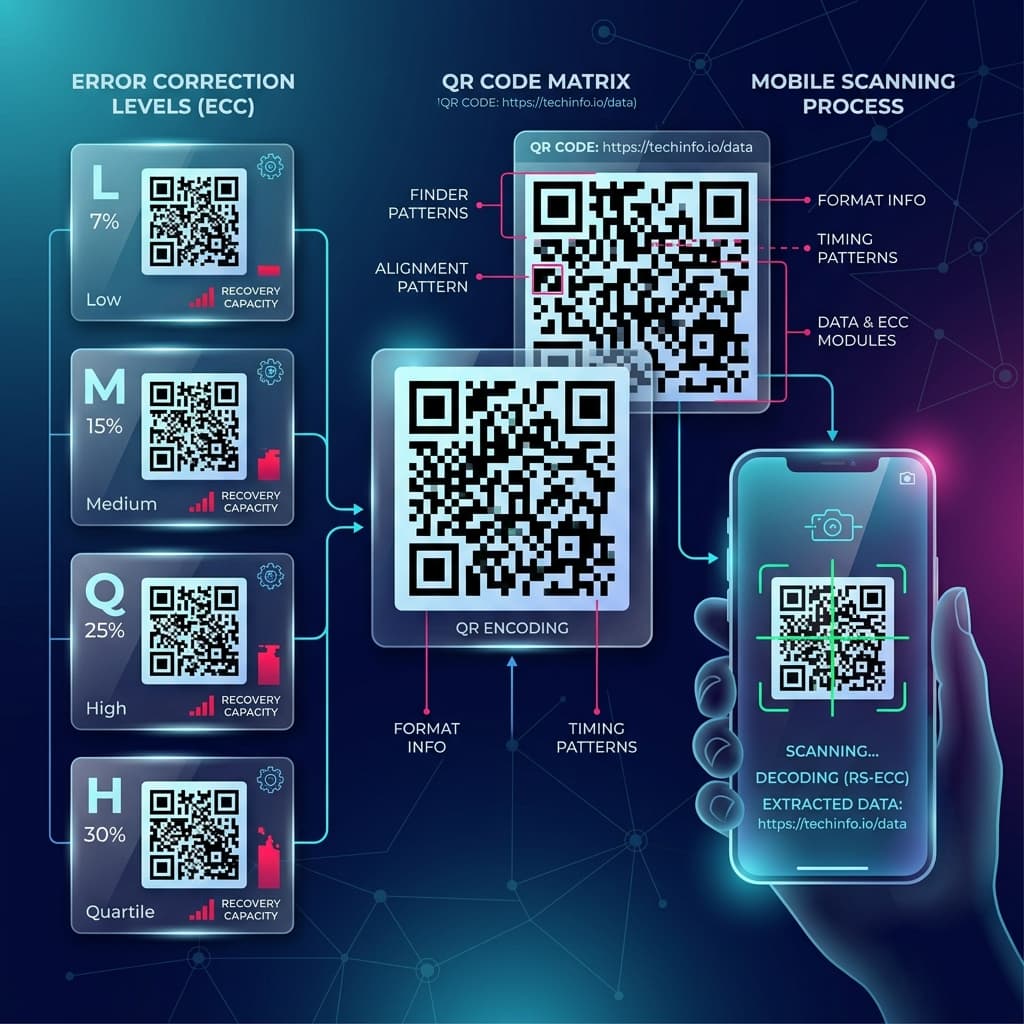
When you use a free qr code builder, the tool utilizes advanced mathematics to map your text into a 2D matrix. Here is a breakdown of what makes up the image:
1. Finder Patterns (The Three Big Squares): Located in three corners, these squares tell the smartphone camera which way is up and how to align the grid.
2. Alignment Patterns (The Smaller Squares): Used in larger QR codes to help scanners read the code even if the paper is bent or curved.
3. Timing Pattern: Alternating black and white dots connecting the finder patterns, telling the scanner how wide a single pixel is.
4. Error Correction Information: A built-in failsafe that allows the code to be read even if parts of it are torn or covered in dirt.
Error Correction Levels Explained
When making free qr codes, a high-quality builder will let you choose your Error Correction Level (Reed-Solomon error correction):
- Level L (Low): Restores 7% of damaged data. Best for clean, digital screens. Creates the simplest, least-dense grid.
- Level M (Medium): Restores 15% of damaged data. The standard default.
- Level Q (Quartile): Restores 25% of damaged data. Good for outdoor print.
- Level H (High): Restores 30% of damaged data. Essential if you want to place a custom logo in the center of your QR code, as the logo effectively "damages" the center pixels.
3. How to Avoid the "Bait and Switch" Freeware
The term qr code generator freeware is highly searched, but heavily abused. Many marketers print thousands of product labels using a "free" generator, only to find out a week later that customers scanning the code are seeing a message that says: *"This QR Code has expired. Pay $19.99/mo to reactivate."*
To avoid this nightmare, follow these rules:
1. Test the Output URL: Before printing, scan the code with your phone. Look closely at the URL that pops up on your screen. If the URL is your exact website (e.g., https://yoursite.com), it is a Static code and is safe to print. If the URL is a short link (e.g., https://qr.to/123), it is Dynamic and will likely expire.
2. Use Client-Side Generators: Look for tools that generate the QR code locally in your browser using JavaScript. These tools do not save your link to a database and cannot hold your code hostage. You can try our reliable QR Code Generator which outputs 100% static, permanent vector files.
4. Creative Ways to Use Your Free QR Code Builder
Most people think QR codes are only for website links, but a good qr qr code generator can encode a variety of useful data formats.
| Data Type | How It Works | Best Use Case |
|---|---|---|
| vCard (Contact Info) | Encodes your name, phone, email, and address. Scanning it prompts the phone to "Add Contact". | Networking events, business cards. |
| Wi-Fi Network | Encodes the SSID, encryption type, and password. Scanning it automatically connects the phone to the network. | Coffee shops, Airbnb hosts, office lobbies. |
| SMS / Email Drafts | Encodes a pre-filled text message and recipient number. | SMS marketing opt-ins, customer support requests. |
| Geo-Location | Encodes latitude and longitude coordinates. Opens Google Maps to a specific pin. | Real estate open houses, hiking trails, hidden venues. |
5. Design Best Practices: Making Scannable Codes
Just because you used a free qr code builder to generate the matrix doesn't mean it will scan well in the real world. Optical physics play a huge role in scan success rates.
The 10:1 Distance Rule
A QR code's physical print size must be related to how far away the user will be when scanning it. Divide the scanning distance by 10 to get the minimum QR code width.
- *Scanning a business card (15 cm away):* Code must be at least 1.5 cm wide.
- *Scanning a poster (2 meters away):* Code must be at least 20 cm wide.
Maintain the Quiet Zone
A QR code must have a blank, solid-color margin around its entire perimeter (usually 4 "modules" thick). If you place text or graphics right up against the edge of the QR code, the camera cannot isolate the finder patterns, and the scan will fail.
Contrast is King
Cameras read contrast. Always use a very dark color for the data modules and a very light color for the background. Never invert the colors (white modules on a black background), as many older Android scanning apps cannot process inverted codes.
Conclusion
Navigating the world of QR codes doesn't have to be an expensive or frustrating experience. By understanding the difference between static and dynamic architecture, knowing how to spot deceptive subscription traps, and following basic optical design rules, you can confidently integrate QR technology into your next project.
Ready to start making free qr codes? Ditch the expensive subscriptions and use a secure, permanent, client-side QR Code Builder to export crisp SVG vectors for your next print campaign.